
django5 文档

视图请求代码
def index(request):
return render(request, "index.html")
路由变量 比如/blog/12 12就是我们设置的变量。 变量可以是多个。blog/1/2/2/2
路由重定向
path('redirecTo', RedirectView.as_view(url='index/')),
我们访问 http://localhost/redirecTo 浏览器地址会发生变化。 http://localhost/index/
浏览器f12会显示 请求/redirecTo是 302 下面会有一个新的请求 index/ 状态是200
自定义视图的重定向
def blog(request, id):
if id == 0:
return redirect("/static/err.html")
return HttpResponse(f"id是{id} 的页面 ")
我们访问 http://localhost/blog/0 浏览器地址会发生变化。 http://localhost/static/err.html
浏览器f12会显示 请求/redirecTo是 302 下面会有一个新的请求 err.html 状态是304
清空浏览器缓存后,第一次访问 blog/0,重定向后的 err.html 会返回 200(因为没有缓存)。
第二次访问 blog/0,重定向后的 err.html 会返回 302(使用缓存)。
def blog(request, id):
if id == 0:
return redirect("/static/err.html",permanent=True)
return HttpResponse(f"id是{id} 的页面 ")
加个true 就 301 了。 从磁盘缓存
def index(request):
html = "<h1>学python java 来java456.com</h1>"
return HttpResponseNotFound(html)
浏览器f12会显示 请求index/是 404 页面会显示这个html内容
不加html 就先错误页面。 文档46页有截图。
内置模板引擎-模板继承
在模板继承中最常用了标签就是 {% block %}与 {f% extends %} 标签,其中 {% block%}标签与(% endblock %} 标签成对出现我们新建一个基础模版base.html
base.html
缓存的使用
from django.core.cache import cache
from django.conf import settings
from user.models import Config


# 尝试从缓存获取配置
config = cache.get('site_config')


# 将配置存入缓存,设置过期时间(例如 10 分钟)
cache.set('site_config', config, 600)


补充:如果你的网站配置需要实时生效(修改后立即在页面显示),
可以在修改配置的后台逻辑中主动清除缓存 cache.delete('site_config')。
关于表单的使用
def apiRegister(request):
    username = request.POST.get('username', '')
    pwd = request.POST.get('pwd', '')
    pwd2 = request.POST.get('pwd2', '')

    if MyUser.objects.filter(username=username):
        info = "用户已存在"
    elif pwd != pwd2:
        info = "确认密码不正确"
    else:
        # 定义字典类型。
        d = {
            "username": username,
            "password": pwd,
            "is_superuser": 1

        }
        user = MyUser.objects.create_user(**d)
        user.save()
        info = "注册成功,请登录."
        logout(request)
        # locals 我们在前端页面取到这些值。{{ pwd }}  {{ info }}  如果提交失败了,前端继续保留这东西。而且会显示info信息提醒
    return render(request, 'register.html', locals())


    下面是登录的。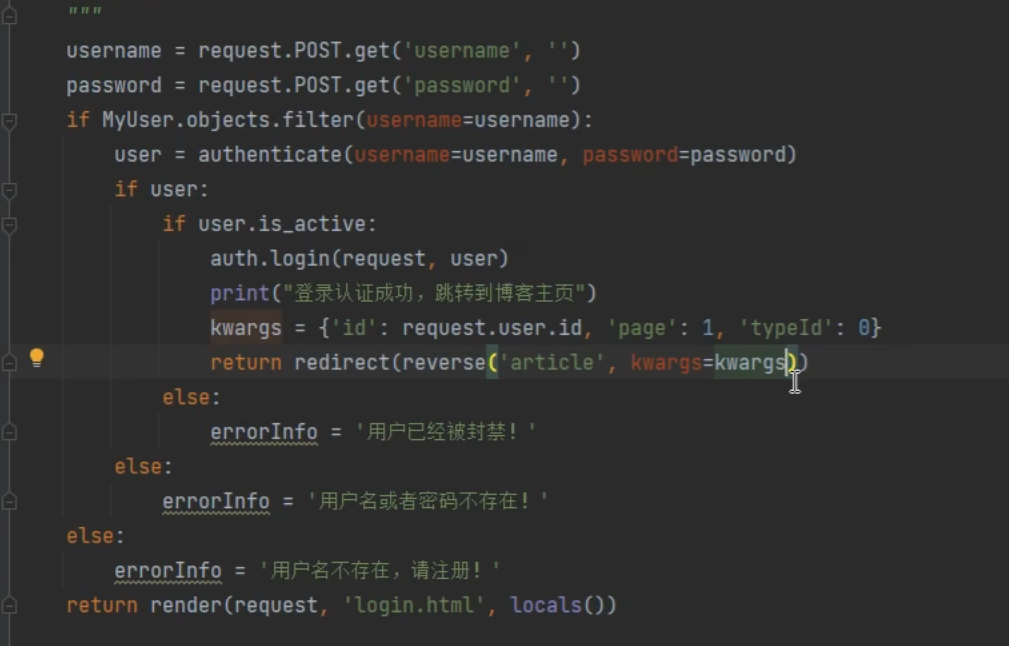
ImageField 字段 说明
avatar = models.ImageField('头像', blank=True, upload_to='avatar/%Y-%m-%d/')


Django 会:按 upload_to='avatar/%Y-%m-%d/' 生成动态路径(比如 avatar/2026-01-09/);
自动给图片生成唯一文件名(避免重名,比如 my_avatar_8f978e.jpg);
将图片文件保存到 MEDIA_ROOT + 动态路径 + 唯一文件名(即 项目根目录/media/avatar/2026-01-09/my_avatar_8f978e.jpg);
在数据库的 avatar 字段中,存储相对路径字符串:avatar/2026-01-09/my_avatar_8f978e.jpg。


# 从数据库查询用户对象
user = UserProfile.objects.get(id=1)
print(user.avatar)  # 输出:avatar/2026-01-09/my_avatar_8f978e.jpg(数据库存储的字符串)
print(user.avatar.path)  # 输出:/项目根目录/media/avatar/2026-01-09/my_avatar_8f978e.jpg(服务器实际文件路径)
print(user.avatar.url)  # 输出:/media/avatar/2026-01-09/my_avatar_8f978e.jpg(前端可访问的 URL)


<!-- 模板中显示头像 -->
<img src="{{ user.avatar.url }}" alt="用户头像">
<!-- 最终渲染为:<img src="/media/avatar/2026-01-09/my_avatar_8f978e.jpg" alt="用户头像"> -->站长微信:xiaomao0055
站长QQ:14496453