
最近搜索
vue3 菜单 默认展开的 menu 折叠 激活

管理员
2025-11-30 21:59
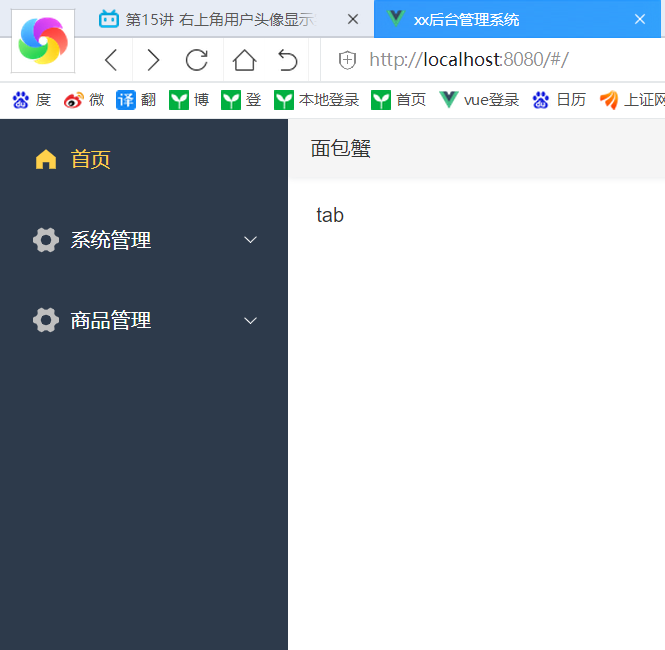
这个菜单 打开默认不是展开的。
怎么让他默认展开
<template>
  <el-menu
      active-text-color="#ffd04b"
      background-color="#2d3a4b"
      class="el-menu-vertical-demo"
      text-color="#fff"
      router
      :default-openeds="defaultOpeneds"
      :default-active="activeIndex"
      mode="vertical"
      :collapse="false"
      :collapse-transition="false"
  >
    <!--   index是唯一标识  不能重复    是否启用 vue-router 模式。 启用该模式会在激活导航时以 index 作为 path 进行路由跳转
    使用 default-active 来设置加载时的激活项。-->

    <el-menu-item index="/index" :collapse="true">
      <el-icon><home-filled /></el-icon>
      <span>首页</span>
    </el-menu-item>

    <el-sub-menu :index="menu.path" v-for="menu in menuList">
      <template #title>
        <el-icon><svg-icon :icon="menu.icon"/></el-icon>
        <span>{{ menu.name }}</span>
      </template>
      <el-menu-item  :index="item.path" v-for="item in menu.children"  @click="openTab(item)">
        <el-icon><svg-icon :icon="item.icon"/></el-icon>
        <span>{{ item.name }}</span>
      </el-menu-item>
    </el-sub-menu>
  </el-menu>
</template>

<script setup>
import {HomeFilled,User,Tickets,Goods,DocumentAdd,Management,Setting,Edit,SwitchButton,Promotion} from '@element-plus/icons-vue'
import {ref,watch} from 'vue'
import store from '@/store'

const menuList=ref(store.getters.GET_MENULIST);
const isCollapse=ref(false);

const defaultOpeneds =ref(['/system','/goods']);

function openTab(item) {
  console.log("我点击的item是:",item);
}
const  activeIndex=ref('/index');
</script>


<style lang="scss" scoped>

</style>
最主要就是添加 const defaultOpeneds =ref(['/system','/goods']);
把他的顶级节点添加进来就行了。
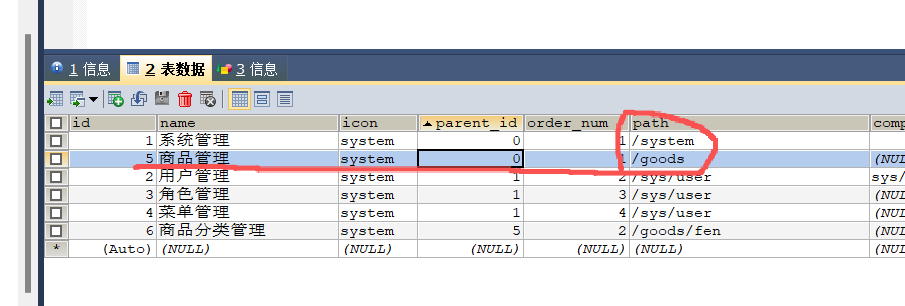
这样默认就展开了。 虽然现在是固定的,后续可以修改动态的。
联系站长
站长微信:xiaomao0055
站长QQ:14496453
按分类分组
按日期分组